
Minecraft Servers (Paper, Velocity & Bungee)
Stop VPN en proxy-verbindingen vóórdat ze je gamewereld betreden.
ProxyTracer controleert het IP-adres van toetredende spelers direct via de uiterst nauwkeurige ProxyTracer API en stelt je in staat om kwaadaardige verbindingen te blokkeren, staff te waarschuwen of puur te loggen. Ideaal om ban evasion, alts en VPN-gebaseerde bot-raids te stoppen.Voorbeeld
| In-Game Kick Screen | Console Warning Alert |
|---|---|
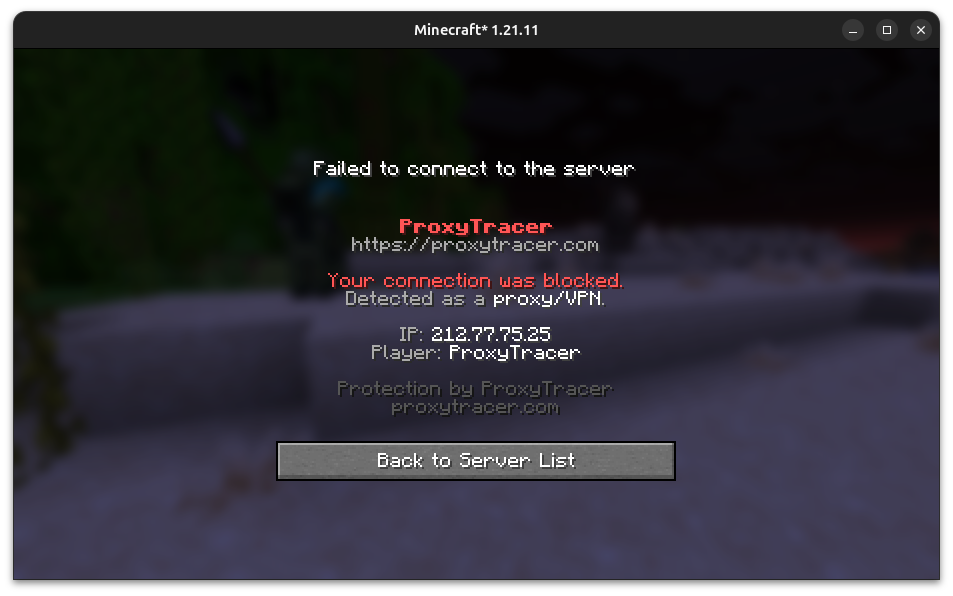 | 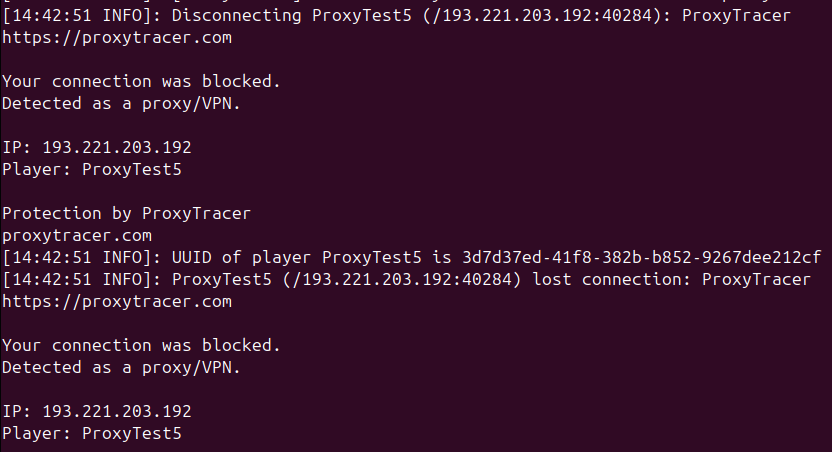 |
Waarom ProxyTracer?
- Real-Time Detection: Accurate checks against ProxyTracer's constantly updated residential and public VPN databases.
- Multi-Platform Native: Dedicated integrations for single servers (Paper/Spigot) and multi-server networks (Velocity or BungeeCord/Waterfall).
- Fast Performance: Built-in in-memory caching saves API credits and ensures returning players connect instantly.
- Smart Whitelist: Whitelist bypass commands for trusted player names and network IPs.
- Discord Alerts: Log blocked VPN joins directly to your staff channels.
-
Branded Kick Screen: Prompts players with a professional block message citing
proxytracer.com.
Welke .jar moet ik installeren?
| Your setup | Install this jar | Location | Action |
|---|---|---|---|
| Enkele Paper / Spigot / Purpur server | proxytracer-bukkit-1.4.0.jar | Game server plugins/ | Download |
| Velocity proxynetwerk | proxytracer-velocity-1.4.0.jar | Proxy server plugins/ (Do not install on Paper) | Download |
| BungeeCord / Waterfall network | proxytracer-bungee-1.4.0.jar | Proxy server plugins/ (Do not install on Paper) | Download |
Snelle Setup (60 Seconden)
- Ontvang een gratis API-key via: ProxyTracer.com/dashboard
- Download de juiste .jar voor jouw setup via Releases.
-
Plaats de jar in de
plugins/map van je server en start de server eenmaal op. -
Stel je API-key direct in-game of via de console in:
(This automatically writes the key to your config file and reloads the plugin).
/proxytracer set your_api_key_here -
Verifieer de verbinding door uit te voeren:
/proxytracer status
Configuratie Highlight
mode: "block"          # Actie bij gedetecteerde proxy: block | warn | log

api:
  base-url: "https://api.proxytracer.com/v1"
  key: "proxy_your_key_here"
  on-error: "allow"    # Fail-open beleid als de API offline gaat: allow | block | warn
  timeout-ms: 2000

notifications:
  in-game: false       # Stuur gekleurde in-game chatberichten naar staff (proxytracer.notify)

cache:
  enabled: true
  ttl-minutes: 1440    # Cache het resultaat van de IP-check gedurende 24 uur
  max-entries: 10000

discord:
  enabled: false
  webhook-url: ""
  notify-blocked: true
Commando's & Permissies
Alle commando's beginnen met /proxytracer:
-
/proxytracer notify <on|off|toggle>— Schakel in-game gekleurde chatberichten voor staff in of uit. -
/proxytracer notify add|remove|list [player]— Voeg staff-gebruikersnamen toe, verwijder ze of bekijk de lijst voor in-game notificaties (automatisch opgeslagen inconfig.yml). -
/proxytracer set <api_key>— Stel de API-key direct in, sla op in config.yml en herlaad. -
/proxytracer status— Controleer de configuratiestatus, API-inloggegevens en notificatiestatus. -
/proxytracer check <ip>— Query an IP address manually. -
/proxytracer cache clear— Wis de lokale IP-cache. -
/proxytracer reload— Herlaad het configuratiebestand. -
/proxytracer whitelist name add|remove|list [player]— Sluit spelers uit van controles. -
/proxytracer whitelist ip add|remove|list [ip]— Sluit netwerk-IP's uit van controles.
Permissions:
-
proxytracer.admin— Toegang tot reload-, status- en beheercommando's. -
proxytracer.bypass— Spelers met deze permissie omzeilen controlevereisten tijdens de pre-login. -
proxytracer.notify— Staff ontvangt in-game waarschuwingen wanneer een VPN-gebruiker wordt gelogd of gewaarschuwd.
(Note: By default, these permissions are assigned only to server Operators (OPs). To grant these permissions to other players or staff groups, use a permissions manager plugin like LuckPerms).
Compatibiliteit & Vereisten
- Java Version: Java 17 or higher (fully tested on Java 17, 21 and 22). De plugin is gecompileerd voor Java 17.
- Server Software Support: Paper / Spigot / Purpur (1.13 to 1.21.x), Velocity (3.x) en BungeeCord / Waterfall (moderne builds).
- API Access: Een gratis of betaalde API-key geregistreerd via proxytracer.com.
Troubleshooting: Werkelijke IP-problemen (127.0.0.1)
Als in je logs staat dat elke toetredende speler verbindt vanaf 127.0.0.1, kan de ProxyTracer API ze niet scannen. Dit geeft aan dat de netwerkindeling van je host of je front-end proxy de inkomende IP's van spelers maskeert.
Hoe los ik dit op:
-
Voor Proxynetwerken (Velocity / Bungee): Installeer ProxyTracer uitsluitend op de gateway-proxy (Velocity/Bungee). Zorg ervoor dat player info forwarding actief is (
player-info-forwarding-mode = "modern"invelocity.tomlofip_forward: truein Bungee'sconfig.yml), zodat de backend gameservers het werkelijke IP ontvangen. -
Voor Shared Hosts (bijv. TickHosting panel proxy's): Als je host verbindingsheaders doorstuurt via Proxy Protocol, schakel dit dan in binnen je Paper-configuratie (
proxies.proxy-protocol: trueinconfig/paper-global.yml) en herstart. Waarschuwing: Schakel dit alleen in als je host dit expliciet ondersteunt; een onjuiste configuratie zorgt ervoor dat spelers helemaal niet meer kunnen deelnemen.
Prijzen & API Quota
De ProxyTracer Minecraft-plugins zijn 100% gratis. Detectie vereist een verbinding met de ProxyTracer API:
- Free Tier: 100 checks/mnd voor kleine SMP's en development.
- Starter (€3/mnd): Ideaal voor groeiende openbare servers.
- Pro (€9/mnd) / Scale (€39/mnd): Ontworpen voor gevestigde netwerken.
Maak je key aan & kies een abonnement: ProxyTracer