
Discourse
The official ProxyTracer integration for Discourse. This plugin brings enterprise-grade IP intelligence to your community, automatically detecting known VPNs, proxies, datacenters and Tor nodes and giving you the option of preventing them from registering, or logging in, or even from viewing your Discourse forum entirely.
The plugin is distributed through this Github repository.
Features
- Granular control allowing administrators to enforce IP validation during new user registrations, existing user authentication, or globally for all site visitors.
- Built-in Redis caching stores recent IP address evaluations, drastically reducing external API calls and ensuring zero latency.
- In the event of an API timeout or network failure, the plugin prioritizes user access to prevent wide-scale lockouts. This behavior can be changed through the options.
- Built-in support for exact IP and CIDR subnet whitelisting.
Installation
-
Access your server via SSH and navigate to your Discourse directory:
cd /var/discourse -
Open your container configuration file for editing:
nano containers/app.yml -
Locate the
hookssection and append the repository clone command directly below thedocker_managerinstallation:hooks: after_code: - exec: cd: $home/plugins cmd: - git clone https://github.com/discourse/docker_manager.git - git clone https://github.com/proxytracer/discourse-proxytracer.git -
Save the configuration file and rebuild your Discourse container to compile the plugin:
./launcher rebuild app
Configuration:
- Procure a standard API key from the ProxyTracer Dashboard.
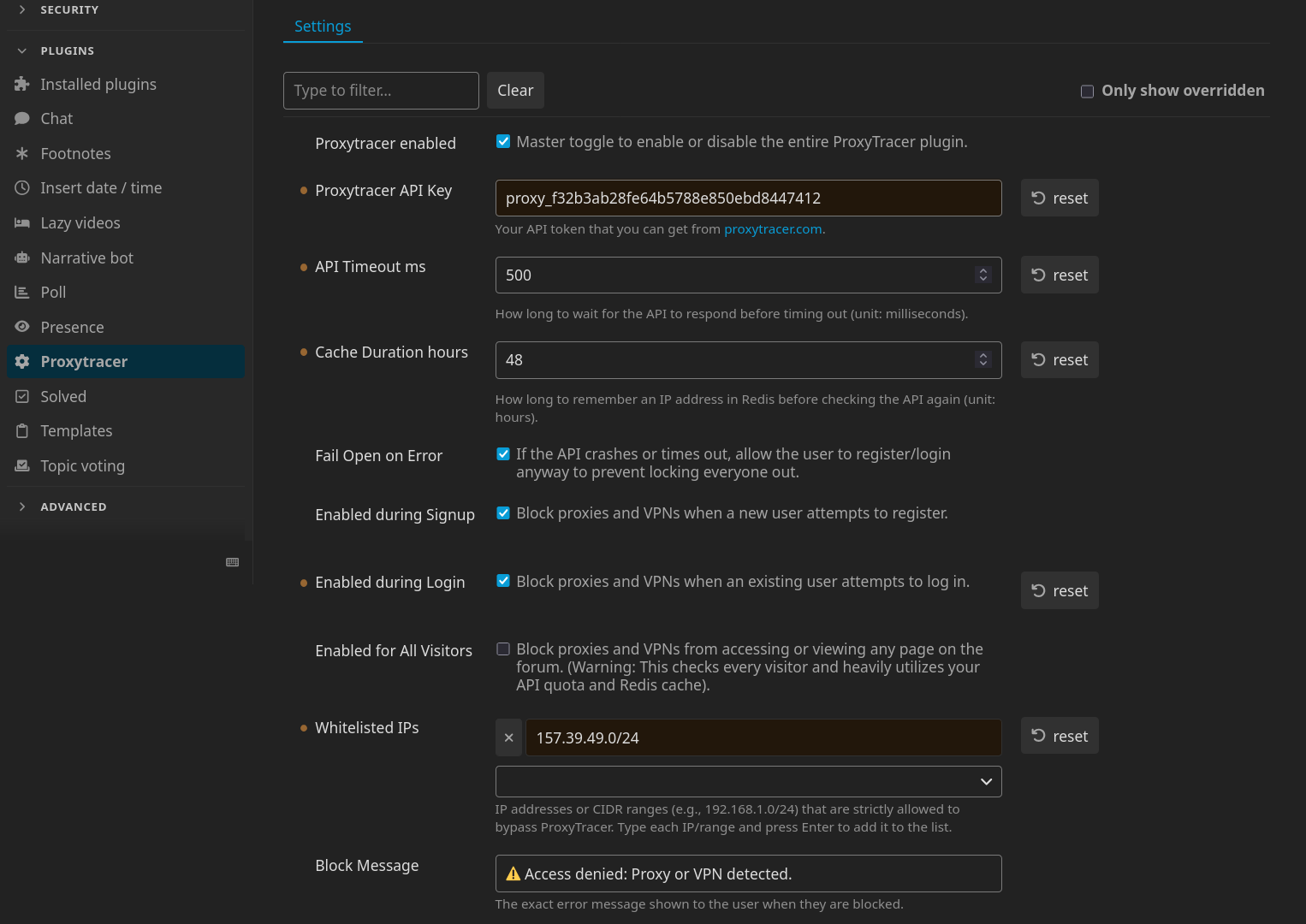
- Navigate to your Discourse administration panel: Admin → Plugins → ProxyTracer to find ProxyTracer's settings.
-
Input your API key into the
ProxyTracer API Keyfield. -
Enable the protection parameters by toggling
Enabled during Signup,Enabled during Loginand/orEnabled for All Visitors. -
Add any trusted IPs or CIDR ranges to the
Whitelisted IPslist. - (Optional) Adjust the API timeout and Redis cache duration limits to suit your server's specific traffic requirements.
- (Optional) Customize the Block Message that appears to blocked users. For instance, you can add instructions for contacting the administration of the site in case they believe that the block isn't warranted and that they're not accessing the site through a proxy or VPN.
Network Configuration: Cloudflare & Reverse Proxies
Please follow the configuration guidelines below that match your server's architecture to ensure accurate IP forwarding.
Direct Cloudflare Integration (Standard Installation)
This applies if your Discourse server connects directly to the internet and utilizes Cloudflare exclusively for DNS and edge proxying. In this standard setup, you must configure Discourse to trust Cloudflare's IP ranges and extract the true client IP from the incoming headers.
-
Connect to your server via SSH and edit your container configuration:
nano /var/discourse/containers/app.yml -
Locate the
templates:block and append the official Cloudflare templatetemplates/cloudflare.template.yml:templates: - "templates/postgres.template.yml" - "templates/redis.template.yml" - "templates/web.template.yml" - "templates/web.ratelimited.template.yml" - "templates/cloudflare.template.yml" -
Save the file and rebuild the Discourse container to apply the changes:
./launcher rebuild app
Multi-Layer Proxy Architecture (Cloudflare + Local Reverse Proxy)
This applies if your Discourse instance is routed through a local server management panel or reverse proxy (e.g., CloudPanel, Nginx Proxy Manager, Traefik, Plesk) which sits behind Cloudflare. In a multi-layer (or "double") reverse proxy architecture, the standard Discourse cloudflare.template.yml will fail because the traffic is handed to Discourse by your local network interface, not directly by Cloudflare. Do not use the Cloudflare template in this scenario.
Instead, you must configure your local reverse proxy to extract the true client IP from the CF-Connecting-IP header, but only for traffic originating from trusted Cloudflare IP addresses. Blindly passing this header without verifying the source allows malicious users to bypass rate limits and bans by spoofing their IP address.
# IPv4 Cloudflare IPs, see https://www.cloudflare.com/ips/
set_real_ip_from 173.245.48.0/20;
set_real_ip_from 103.21.244.0/22;
set_real_ip_from 103.22.200.0/22;
set_real_ip_from 103.31.4.0/22;
set_real_ip_from 141.101.64.0/18;
set_real_ip_from 108.162.192.0/18;
set_real_ip_from 190.93.240.0/20;
set_real_ip_from 188.114.96.0/20;
set_real_ip_from 197.234.240.0/22;
set_real_ip_from 198.41.128.0/17;
set_real_ip_from 162.158.0.0/15;
set_real_ip_from 104.16.0.0/13;
set_real_ip_from 104.24.0.0/14;
set_real_ip_from 172.64.0.0/13;
set_real_ip_from 131.0.72.0/22;

# IPv6 Cloudflare IPs
set_real_ip_from 2405:b500::/32;
set_real_ip_from 2405:8100::/32;
set_real_ip_from 2803:f800::/32;
set_real_ip_from 2c0f:f248::/32;
set_real_ip_from 2a06:98c0::/29;

real_ip_header CF-Connecting-IP;
Next, locate your location / or @reverse_proxy directive. Because of the configuration above, Nginx will now safely resolve $remote_addr to the true client IP only if the request actually passed through Cloudflare. Modify your IP forwarding headers as follows:
location / {
    proxy_set_header X-Real-IP $remote_addr;
    proxy_set_header X-Forwarded-For $proxy_add_x_forwarded_for;

    ...
}
Save the configuration and reload your host's Nginx service. A Discourse container rebuild is not required for this step.
Validation and Testing
To verify that your networking configuration is successfully passing the correct data to ProxyTracer:
- Navigate to your Discourse administrative dashboard: Admin → Users.
-
Review the
Registration IPorLast IPcolumns for recent activity.-
Incorrect Setup: If you observe Cloudflare IPs (see here for a full list) or local network IPs (e.g.,
127.0.0.1,172.x.x.x), IP forwarding is failing. ProxyTracer cannot protect your site in this state. - Correct Setup: If you observe standard, unique residential IP addresses, your network architecture is configured correctly and ProxyTracer is actively monitoring your traffic.
-
Incorrect Setup: If you observe Cloudflare IPs (see here for a full list) or local network IPs (e.g.,
Emergency Access
cd /var/discourse
./launcher enter app
rails c
SiteSetting.proxytracer_enabled = false
exit
exit
License
This plugin is licensed under the GNU Affero General Public License v3.0 (AGPLv3).