
Flarum
The official ProxyTracer integration for Flarum. This extension brings enterprise-grade IP intelligence to your community, automatically detecting known VPNs, proxies, datacenters, and Tor nodes, and giving you the option of preventing them from registering, logging in, or viewing your Flarum forum entirely.
The full source code can be found on Github. The extension is distributed through Packagist.
Features
- Granular control allowing administrators to enforce IP validation during new user registrations, existing user authentication, or globally for all site visitors.
- Built-in caching utilizing Flarum's native Laravel Cache API stores recent IP address evaluations, drastically reducing external API calls and ensuring zero latency.
- In the event of an API timeout or network failure, the extension prioritizes user access (fail-open) to prevent wide-scale lockouts. This behavior can be toggled in the settings.
-
Built-in support for exact IP and CIDR subnet whitelisting (e.g.,
192.168.1.0/24).
Installation
-
Access your server via SSH and navigate to your Flarum root directory (where your
composer.jsonis located):cd /var/www/flarum -
Install the extension via Composer:
composer require proxytracer/flarum-proxytracer -
Clear your Flarum cache to compile the new frontend assets:
php flarum cache:clear
Configuration:
- Procure a standard API key from the ProxyTracer Dashboard.
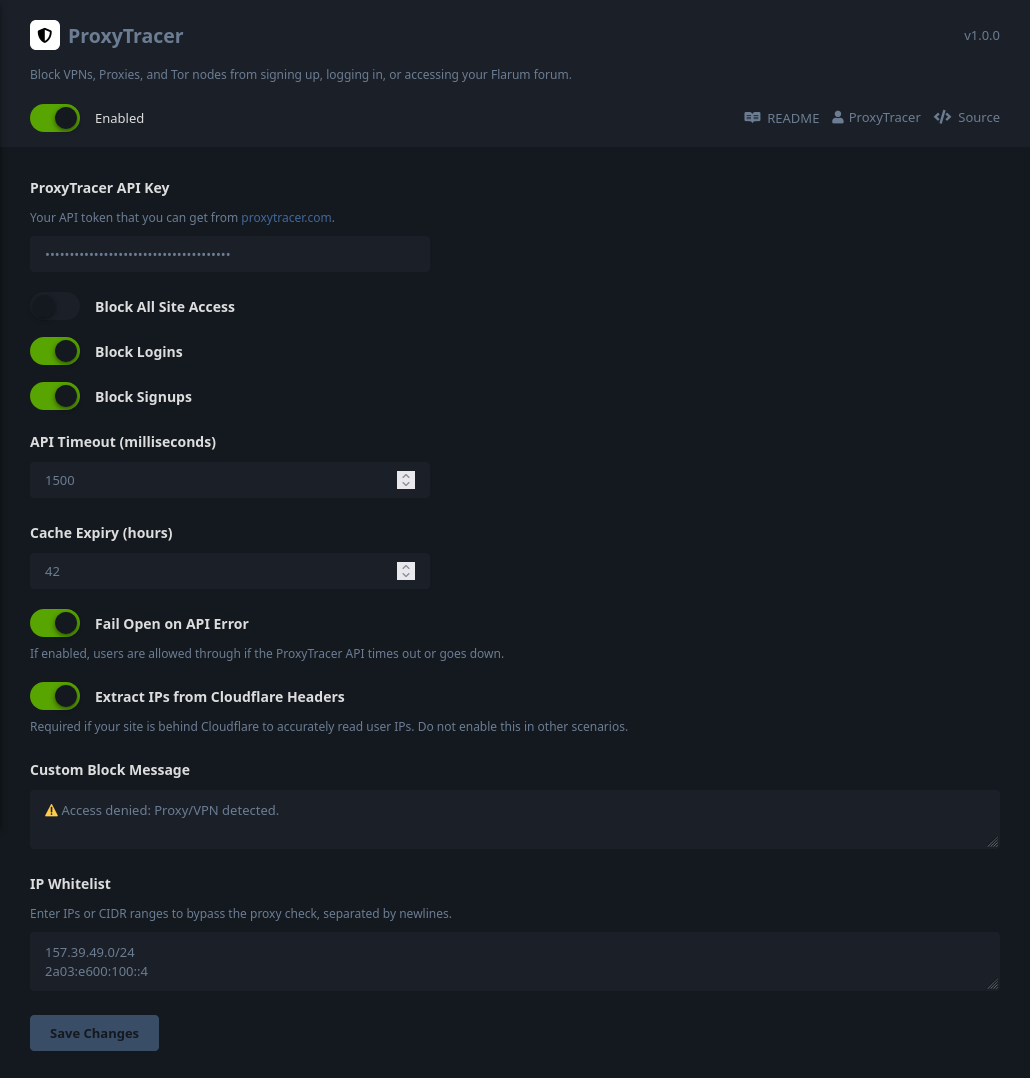
- Navigate to your Flarum administration panel: Admin → Features → ProxyTracer to open the settings modal.
-
Input your API key into the
API Keyfield. -
Enable the protection parameters by toggling
Block Signups,Block Logins, and/orBlock All Site Access. -
Add any trusted IPs or CIDR ranges to the
IP Whitelist(one per line). - (Optional) Adjust the API timeout and Cache Expiry limits to suit your server's specific traffic requirements.
- (Optional) Customize the Block Message that appears to blocked users. For instance, you can add instructions for contacting the administration of the site in case they believe that the block isn't warranted and that they're not accessing the site through a proxy or VPN.
Network Configuration: Cloudflare & Reverse Proxies
Please follow the configuration guidelines below that match your server's architecture to ensure accurate IP forwarding.
Direct Cloudflare Integration (Standard Installation)
If your Flarum server connects directly to the internet and utilizes Cloudflare exclusively for DNS and edge proxying, you can use the extension's built-in Cloudflare bypass.
Inside the ProxyTracer Flarum settings, simply toggle on Extract IPs from Cloudflare Headers.
ProxyTracer will automatically extract the true client IP from Cloudflare's proprietary CF-Connecting-IP header. Note: Only enable this setting if your server is directly facing Cloudflare. Enabling this on a non-Cloudflare setup could allow malicious users to bypass restrictions by spoofing their IP headers.
Multi-Layer Proxy Architecture (Cloudflare + Local Reverse Proxy)
This applies if your Flarum instance is routed through a local server management panel or reverse proxy (e.g., Nginx Proxy Manager, CloudPanel, Traefik, Plesk) which sits behind Cloudflare. In a multi-layer (or "double") reverse proxy architecture, the simple toggle is not enough because the traffic is handed to Flarum by your local network interface, not directly by Cloudflare.
You must configure your local reverse proxy to extract the true client IP from the CF-Connecting-IP header, but only for traffic originating from trusted Cloudflare IP addresses. Blindly passing this header without verifying the source allows malicious users to bypass rate limits and bans by spoofing their IP address.
# IPv4 Cloudflare IPs, see [https://www.cloudflare.com/ips/](https://www.cloudflare.com/ips/)
set_real_ip_from 173.245.48.0/20;
set_real_ip_from 103.21.244.0/22;
set_real_ip_from 103.22.200.0/22;
set_real_ip_from 103.31.4.0/22;
set_real_ip_from 141.101.64.0/18;
set_real_ip_from 108.162.192.0/18;
set_real_ip_from 190.93.240.0/20;
set_real_ip_from 188.114.96.0/20;
set_real_ip_from 197.234.240.0/22;
set_real_ip_from 198.41.128.0/17;
set_real_ip_from 162.158.0.0/15;
set_real_ip_from 104.16.0.0/13;
set_real_ip_from 104.24.0.0/14;
set_real_ip_from 172.64.0.0/13;
set_real_ip_from 131.0.72.0/22;

# IPv6 Cloudflare IPs
set_real_ip_from 2405:b500::/32;
set_real_ip_from 2405:8100::/32;
set_real_ip_from 2803:f800::/32;
set_real_ip_from 2c0f:f248::/32;
set_real_ip_from 2a06:98c0::/29;

real_ip_header CF-Connecting-IP;
Next, locate your location / directive. Because of the configuration above, Nginx will now safely resolve $remote_addr to the true client IP only if the request actually passed through Cloudflare. Modify your IP forwarding headers as follows:
location / {
    proxy_set_header X-Real-IP $remote_addr;
    proxy_set_header X-Forwarded-For $proxy_add_x_forwarded_for;

    ...
}
Save the configuration and reload your Nginx service (systemctl reload nginx).
Emergency Access
cd /var/www/flarum
php flarum extension:disable proxytracer-proxytracer
php flarum cache:clearsettings table, locate the proxytracer.block_all key, change its value to 0, and run php flarum cache:clear.License
This software is licensed under the GNU Affero General Public License v3.0 (AGPLv3). See the LICENSE file for full details.